
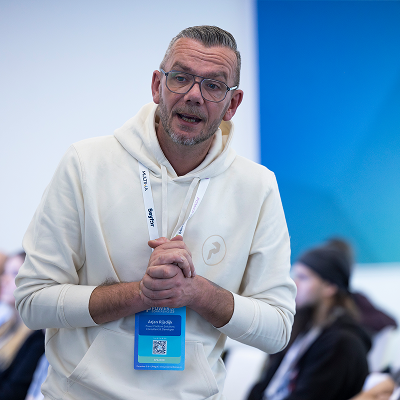
Arjan Rijsdijk
Senior Power Platform Consultant | Microsoft Power Apps MVP | Developer | PowerAddict | Speaker
Rotterdam, The Netherlands
Actions
I’m Arjan Rijsdijk, a Power Platform enthusiast, or as I like to call myself, a Power Addict, based in the Rotterdam area in the Netherlands. I work at Powerbouwer on some of the coolest Power Platform projects, always focused on creating real added value for users.
My first introduction to the Power Platform showed me how much impact smart low-code and vibe-code solutions can have. Since then, I’ve kept building, experimenting and learning. What I enjoy most? Working with other Power Platform experts and pushing each other to the next level.
I also love sharing that passion as a speaker. At events and sessions, I talk about the Power Platform, my experiences and the lessons I pick up along the way.
Learn something new every day. Stay Hungry. Stay Foolish.
Badges

Area of Expertise
Topics
Automated testing in the Power Platform: matching governance and upholding quality.
Everyone in IT knows testing is crucial, even in low-code setups. In this session, we'll look at how testing and governance go hand-in-hand and share some practical tips for testing Power Apps Canvas and Power Automate. The goal isn't to slow down production but to make sure everything meets standards and reduces risks.
We'll delve into governance testing principles and demonstrate how to embed testing throughout your development process across various testing levels. You’ll learn how to leverage tools like Monitor, Test Studio, Test Engine, and Playwright to enhance your testing strategy and streamline the overall workflow. Join us to discover how to create a robust testing framework that supports quality and compliance while maintaining efficiency in your development lifecycle.
Play it (w)right: automate your UI testing
Proper testing of a user interface is crucial, but can also be very time-consuming. And that’s no different when working with Power Platform solutions. But what if it could be faster, easier, and smarter?
In this session, you’ll learn how to automate UI testing using Playwright. I’ll show you how to record a simple test to automatically check the user interface of your Power App(s) in different scenario's.
In a live demo, I will walk you through:
- Creating and running tests across multiple browsers, devices, and screen sizes
- Capturing screenshots during tests to document test results
- Adding assertions to check whether your app behaves as expected
- The various ways of viewing your test results
We will also briefly take a look at integrating your UI tests into your CI/CD pipelines and how to use Playwright to check the accessibility of your app.
Flexibility meets functionality: get the most out-of-the-box for building dynamic forms
Let's get inspired by a real world example; adaptable to various scenarios. Everyone working with the Power Platform has probably got the request to create all sorts of forms to enter and validate data in it to support a business process. This presentation demonstrates a solution facilitating collaborative data review involving diverse stakeholders.
Explore the process of defining a Dataverse data model. Witness administrators seamlessly handling questions and customizing answer types within a Model Driven App and effectively managing the process. This background system transforms a Power Apps Canvas into a mature user-friendly dynamic form solution, allowing users to answer questions. Providing different stakeholders with extensive commenting functionalities inspired by the comment sections in Word and easier, more flexible, commenting by using Power Apps Cards in Microsoft Teams.
By the end of this session, attendees will have a solid understanding of how to make it possible to create a data review system using only out-of-the box functionalities within the Power Platform, being fully transparent and ready for audit trails.
Model-driven gaps ... How to fill these gaps with custom pages!
You've probably developed a model-driven app where you ran into limits and thought .... maybe I should have opted for a canvas app after all?
Model-driven apps are cool, but not always flexible enough to solve the whole problem, by using custom pages the possibilities have become almost endless. However, there are also challenges in using custom pages. When and how do you use these custom pages and how do you ensure a good and consistent user interface?
In this session I will use several examples and live demos to take you into the world of custom pages. How to create and use custom pages. How to add a good and consistent user interface that fits seamlessly to your model-driven app and how to build and use reusable components for your custom pages. Of course I will also share my experiences, tips and pitfalls with you during this session.
After this session you will have a good understanding of how to implement custom pages. How you can use library components, Creator Kit or out-of-the-box controls to create a nice and solid user interface.
Play it (w)right: automate your end-to-end tests in the Power Platform
Everyone knows software testing is crucial, especially now that we’re letting agents build our apps! Testing is often seen as the necessary evil, time-consuming work. It can be done differently: automate your tests in the Power Platform!
The goal isn't to slow down production but to make sure everything meets standards and reduces risks. So I'll take you into the world of automated testing in the Power Platform. This session is fully packed with live demos. I will share tips on how to use and extend the Power Apps Live monitor to test and monitor your apps. We will take a look at the Power Apps Test Studio and dive deep into automated end-to-end testing using Playwright.
By the end of the session, you will have learned about the differences between Power Apps Test Studio and Playwright and have a practical understanding of how to implement Playwright into your workflow, making your testing not only more efficient but also more robust.
Building a dynamic data review system using Power Platform capabilities
Let's get inspired by a real world example; adaptable to various scenarios, this presentation demonstrates a solution facilitating collaborative data review involving diverse stakeholders.
Explore the process of defining a Dataverse data model. Witness administrators seamlessly handling questions and customizing answer types within a Model Driven App and effectively managing the process. This background system transforms a Power Apps Canvas into a mature user-friendly dynamic form solution, allowing users to answer questions. Providing different stakeholders with extensive commenting functionalities inspired by the comment sections in Word and easier, more flexible, commenting by using Power Apps Cards in Microsoft Teams.
By the end of this session, attendees will have a solid understanding of how to make it possible to create a data review system using only out-of-the box functionalities within the Power Platform, being fully transparent and ready for audit trails.
One build to rule them all: master reusability in the Power Platform
Tired of reinventing the wheel every time you build an app or flow? In this session, I’ll share how reusability in the Power Platform can save you time, bring consistency, and make development a lot more fun.
I’ll show you how to design and apply reusable components that make your apps faster to build and easier to maintain. We’ll look at how YAML can streamline your setup, how to create Power Automate flows you can truly reuse, how to build reusable functions for your Canvas apps with user-defined functions and how environment variables and Dataverse functions help you avoid duplication while keeping everything consistent.
This session is for makers and developers who want to stop repeating themselves and start building smarter. With practical tips and live demos, you’ll leave with concrete ideas you can apply right away — helping you not just to develop faster, but to develop better.
From Custom to Generative: Filling Model-Driven gaps with pages
You've probably developed a model-driven app where you ran into limits and thought .... maybe I should have opted for a Canvas app after all?
Model-driven apps are powerful, but sometimes they just don’t go far enough. With custom pages, we have the freedom to design flexible user experiences right inside our model-driven apps. In this session, I’ll show you how to create and use custom pages, and leverage Creator Kit components to build scalable solutions.
But the story doesn’t stop there — Microsoft has recently introduced generative pages. What does this mean for the future of model-driven apps? How can AI help you create pages faster, and how do these new generative pages compare to custom pages?
Join me for several examples, live demos, and a look into the future. After this session, you’ll have a good understanding of how to implement custom pages, but also understand how generative pages will shape the next generation of Power Apps.
Vibe coding in the Power Platform: opportunities, pitfalls, and reality
You’ve probably heard the phrase “Low-code is dead — as we know it” more than once. But is that really true? Is low-code truly disappearing, or is it simply evolving?
The Power Platform is changing rapidly under the influence of AI. Building apps is no longer just about dragging controls onto a canvas or writing formulas. It’s about expressing intent and letting agents do the heavy lifting.
AI-driven “vibe coding” promises speed, flexibility, and a new way of working. But what does that look like in practice?
In this session, we take a realistic look at the vibe coding capabilities of the Power Platform. Through hands-on demos, you’ll see how to create generative pages for model-driven apps, build applications via vibe.powerapps.com and develop Code Apps using Visual Studio Code, and we will also take a look at building managed apps with Copilot Studio. Along the way, we’ll discuss what this evolution means for governance, quality, and the role of makers and developers.
This session is for makers, developers, and consultants who have experience building (low code) apps within the Power Platform. Basic knowledge of Visual Studio Code is helpful, but not required.
Back to the terminal, where GitHub Copilot CLI meets the Power Platform
Thought the terminal was only for hardcore developers? Yeah… think again.
In this session, I’m taking you back to the terminal, but not the one you remember. With GitHub Copilot CLI, the terminal becomes something completely different: a smart, AI-powered workspace that actually works with you. Fast. Flexible. And… pretty fun.
We’ll kick things off with the basics: how to get started and what GitHub Copilot CLI can really do. But that’s just the warm-up.
Because the real game changer? Plugins.
I’ll show you how they’re structured, how to use them in your daily workflow, and how to build your own, so GitHub Copilot starts working exactly the way you want.
And then we take it further. We bridge into the Power Platform.
From your terminal, we’ll build code apps, generate pages for model-driven apps, and even create Power Pages solutions.
Yes, directly from your terminal.
This session is for consultants, developers, and solution architects who want to move faster, work smarter, and actually use AI instead of just talking about it. Expect live demos. Expect practical insights. And expect at least a few moments where you think: “Okay, I’m trying this tomorrow.”
Testing is fun, as long as you play It (w)right
Everyone knows that software testing is crucial; especially now that AI agents help us build apps faster than ever. Yet testing is often seen as a necessary, time-consuming chore. Let's change that with automated testing in the Power Platform.
The goal of testing is not to slow down development, but to ensure functionality meets expectations, quality standards are maintained, and risks are reduced. In this session, I'll take you into the world of automated testing in the Power Platform. Through practical demos and real-world examples, you'll discover how to use end-to-end testing with Playwright, covering setup, best practices, CI/CD integration, and the emerging AI capabilities that can help streamline test creation and maintenance. Whether you're working with Canvas Apps, Code Apps, Power Pages, or other modern web applications such as Business Central, you'll learn how automated testing can become a practical part of your development process.
The focus is practical: not just why testing matters, but how to get started without making it overly complex.
By the end of this session, you will:
- Understand the differences between manual testing and automated end-to-end testing with Playwright in the context of the Power Platform.
- Be able to set up a basic Playwright test suite for not just code and canvas apps, but also Dynamics 365 and Business Central applications.
- Know how to use Live Monitor telemetry to make tests more robust and diagnostically useful.
Play It (W)right: Automate Your End-to-End Tests in the Power Platform
Modern Power Platform solutions are becoming increasingly complex, making reliable end-to-end testing more important than ever. This session helps Power Platform teams adopt Playwright as their primary testing framework.
You'll learn about Playwright architecture, browser automation, accessibility testing, device emulation, screenshot and video capture, and integration with GitHub and Azure DevOps pipelines.
We'll also look at how AI and Playwright work together. Through Playwright MCP workflows, Playwright Agents, and the Playwright CLI with skills, you'll see how intelligent automation can accelerate test creation, maintenance, and diagnostics.
Key takeaways
- Build scalable Playwright test suites for Power Platform solutions, as well as modern web applications such as Dynamics 365 and Business Central.
- Apply practical patterns for accessibility testing, device emulation, visual validation, and ALM integration.
- Understand how AI-enabled Playwright workflows can accelerate test development, maintenance, and troubleshooting.
Choose your driver: (Power) Apps versus AI Agents
The starting lights are on. The business challenge is set. The only question is… Who gets to drive?
Should you build a Power App? An AI Agent? Or are you better off combining both?
In this fun, fast-paced, two-speaker showdown, we'll race through real-world Power Platform scenarios. For every challenge, one speaker takes the wheel with a traditional Power App, while the other bets everything on an AI Agent.
Each race explores:
🏎️ Speed to build
🧠 User experience
🔒 Governance and security
💰 Cost and maintenance
🚀 Scalability
🤖 AI capabilities
After every round, you decide who crosses the finish line first.
Expect demos, friendly rivalry and practical guidance you can use the very next day.
Because in the Power Platform world, there isn't one vehicle that wins every race: the best architects know which driver belongs on which track.
Ready? Three... Two... One... Go! 🏁
The Inven(s)tory: Know What’s in Your Tenant
Once upon a time, the CoE Starter Kit helped many of us keep track of what was being built across our tenants. It gave us the insight good governance needs. But as tenants grew, inventory syncs could take hours, and the kit is no longer actively maintained. So where do we go from here?
Power Platform Inventory offers a new foundation for understanding what’s happening across your tenant. Through practical demos, we’ll explore it in the admin center, query it with KQL in Azure Resource Graph, and access it through Power Automate and the Inventory API. We’ll finish by looking at how an agent could help you ask questions of that same data.
You’ll leave knowing what Inventory can reveal, how to access it in different ways, and which approach fits the governance questions your organization needs to answer.
Vibe Coding - Same Prompt, Different App
What happens when you give two AI app-building tools the same requirements? Do you get the same app, and which approach works better?
In this session, we'll take a company's backlog and build the same business application using Power Apps Code Apps and Managed Apps through Copilot Studio.
Through live demos, we'll compare the results, explore where each approach reaches its limits, and see how much work is still needed beyond the initial prompts.
We'll also look at governance, licensing, and lifecycle management. Because generating an app is one thing, but choosing the right approach for a real business scenario is another.
By the end of the session, you’ll have a clearer understanding of which AI-powered app-building experience best fits your needs, whether you're a maker or developer, and regardless of your current skill level.
Midlands Microsoft Meet User group Sessionize Event
Shift+Enter Summit 2026 Sessionize Event
London All Day D365PPUG - July 2026 Sessionize Event
Days of Knowledge Central 2026 Sessionize Event
East of England Power Platform Summit Sessionize Event
Microsoft Cloud Engineering Summit - London 2026 Sessionize Event
Days of Knowledge Nordic 2026 Sessionize Event
ColorCloud Hamburg 2026 Sessionize Event
Canadian Power Platform Summit 2026 Sessionize Event
Norfolk Power Platform User Group User group Sessionize Event
Belgian PowerAddicts POWERTALK! User group Sessionize Event
Power Conference 2025 Sessionize Event
ESPC25 Sessionize Event
Directions EMEA 2025 Sessionize Event
Power Summit 2025 - Power Platform & AI Agents Sessionize Event
Global Power Platform Bootcamp 2025 - Belgium Edition Sessionize Event
CollabDays Bremen
Model-driven gaps ... How to fill these gaps with custom pages!
CollabDays Belgium
Building a dynamic data review system using Power Platform capabilities
2024/2025 Monthly Power Platform UX/UI A11ys User Group Call User group Sessionize Event
CollabDays The Netherlands
Building a dynamic data review system using Power Platform capabilities
Power Platform Learner to Leader User group Sessionize Event
PowerAddictsNL User group Sessionize Event
Arjan Rijsdijk
Senior Power Platform Consultant | Microsoft Power Apps MVP | Developer | PowerAddict | Speaker
Rotterdam, The Netherlands
Actions
Please note that Sessionize is not responsible for the accuracy or validity of the data provided by speakers. If you suspect this profile to be fake or spam, please let us know.
Jump to top