
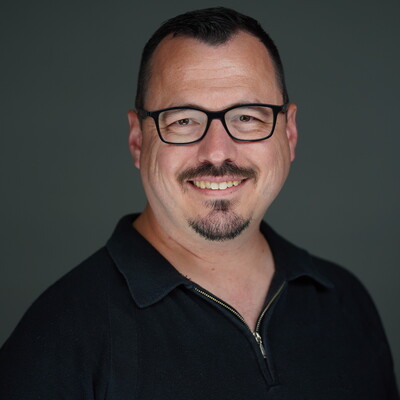
Matt LaCasse
Development Lead | Speaker | Power Platform Expert | 15+ Years Delivering Enterprise Solutions
Ottawa, Canada
Actions
Matt is an accomplished and results-driven senior software development professional with over 15 years of experience in the design, development, and implementation of enterprise applications across numerous Canadian federal departments and municipal agencies. He brings a blend of technical proficiency, project leadership, and solution delivery capabilities, particularly in Microsoft Dynamics 365 and Power Platform, which have been his specialization since 2014.
Matt’s areas of expertise encompass solution architecture, Power Platform customization, DevOps automation, continuous integration/continuous deployment, and complex system integrations.
Area of Expertise
Topics
Beginning your CI/CD journey with Power Platform
Continuous Integration and Continuous Deployment (CI/CD) are no longer “nice to have” practices. They are essential for delivering reliable, scalable Power Platform solutions. But getting started can feel intimidating, especially when navigating the growing set of ALM tools available within the ecosystem. This session introduces CI/CD for Power Platform makers and developers by breaking down the core concepts, showcasing real-world workflows, and comparing the two most popular ALM approaches: Power Platform Pipelines and classic Azure DevOps–based pipelines.
We’ll begin with a clear, practical overview of what CI/CD means in the Power Platform context, including solution management, automation, quality gates, and environment strategies. From there, we’ll compare and contrast the both Power Apps Pipelines and Azure DevOps pipelines, and discuss the strengths and weaknesses of each.
Finally, through side-by-side demos, you’ll see both approaches in action: creating a pipeline, deploying a solution, handling variables and connection references, and managing the deployment lifecycle. By the end, you should have enough in your toolbox to start your ALM journey.
Solutions and other problems
Power Apps solutions are critical to the viability of your application. From developer environments through to UAT & Production, solutions are the vehicle for your configurations & customizations. However there is more than meets the eye with these little zip files, and understanding the options available will help to ensure smoother, more predictable deployments. Through this technical session, we'll highlight the differences between a managed and unmanaged solution. We’ll explore the various options and their importance both when creating a solution, and when adding assets to a solution. We'll dive into the Solution packager tool, and how it's use with source control can enhance visibility into changes to your application. Finally, if time permits, we'll tie it all together with a demo on how to set up build and deploy pipelines in Azure DevOps. Join us as we learn to solve the problem of Solutions, and help ensure your Power Apps deployments are smooth, transparent, & successful.
Configuration Driven Solutions - 5 tips to unchain your Power Apps
Tired of rebuilding your Power Apps every time the business changes its mind? Hard-coded logic may work today, but it becomes technical debt tomorrow. In this session, you’ll discover five practical strategies to design flexible, configuration-driven Power Apps that adapt to evolving requirements, without constant rewrites or hidden formulas.
We’ll explore how to externalize business rules to make logic transparent and easy to update, implement feature flags to turn features on or off dynamically, use environment-aware configurations to ensure your app behaves correctly in development, test, and production, and delegate configuration ownership to empower business teams while maintaining IT governance.
You’ll leave with patterns and best practices you can apply immediately to transform rigid apps into maintainable, future-proof solutions. Regardless of your role within Power Apps, this session will help you build apps that evolve with your organization, improve maintainability, and reduce the risk of costly rework.
SharePoint Integration with Power Apps: Advanced tips and tricks
Wiring SharePoint into a model-driven app takes about ten minutes. Making it behave the way your organization actually needs is where the real work starts, and that part rarely makes it into the documentation.
This session moves fast through the standard setup and spends its time where it counts: the advanced scenarios most teams hit once they're past the demo. We'll look how to leverage Power Automate to enhance your SharePoint experience, take control of the folder structures the platform creates for you, and tackle how strategies for keeping permissions in sync between Power Apps and SharePoint.
You will walk away not just with the step-by-step instructions, but with the knowledge of which choices are hard to backtrack, where the platform quietly makes assumptions on your behalf, and how to design an integration that holds up as your data and your user base grow. Expect hard-earned lessons from real implementations, including the mistakes that are a lot cheaper to learn about from a slide than from production.
Command and Conquer: Enhancing user experiences with the Command Bar
The command bar is an important and often overlooked component of Model Driven Apps. Over the past few years, both the command bar itself and the tools used to customize it have evolved significantly.
In this session, we’ll take a deep dive into model-driven app commanding. Focused on the modern commanding approach, and through real-world scenarios and live demos, we’ll explore performance considerations, JavaScript versus Power Fx extensibility, and practical customization patterns. We will also lightly touch on areas where the Ribbon Workbench still has a place in your toolkit.
All code samples will be provided if you want to follow along in your own environment.
By the end of the session, you’ll have a clearer understanding of the command bar and walk away with actionable tips you can immediately apply to your own Power Platform solutions.
DynamicsCon Regional: Montreal 2026 Sessionize Event
Vancouver Microsoft 365 Summit Sessionize Event
DynamicsCon Regional: Toronto 2026 Sessionize Event
DynamicsCon 2026 Sessionize Event
Vancouver Microsoft 365 Summit Sessionize Event
Dynamics User Group (DUG) Meetup: Canada East Sessionize Event
Please note that Sessionize is not responsible for the accuracy or validity of the data provided by speakers. If you suspect this profile to be fake or spam, please let us know.
Jump to top