

AJ Ansari
Microsoft MVP (Copilot Studio & Business Central), Digital Media Publisher, Podcast Host, C-Suite Executive
Houston, Texas, United States
Actions
AJ is a business leader and a decorated veteran of the Microsoft community, bringing nearly two decades of experience as a trusted advisor to businesses seeking to maximize their AI and ERP investments. He is an 9-time Microsoft MVP, awarded in two categories: Copilot Studio and Business Central. AJ is passionate about sharing his knowledge with the community and has spoken at over 60 global industry events. Through his workshops, bootcamps, conference sessions and online content, AJ has built a reputation for translating complex technical concepts into practical solutions.
AJ is the COO at DSWi, Editor-in-Chief of OnlyCopilotFans.com, host of the OnlyCopilotFans YouTube channel & the OnlyBCFans podcast, founder of Copilot Studio Saturdays, and the creator of the AI Clarity Method.
To book AJ for your next keynote, speaking engagement, or advisory session, contact BookAJ@ChargeOnMedia.com
Badges


Area of Expertise
Topics
Build a fully functional BC Customer Onboarding Agent with Copilot Studio in 45 minutes
When it comes to building custom Agents, Copilot Studio leads the way in the Microsoft ecosystem. It's entirely UI-driven, requires zero coding, and connects natively to Business Central. In this session, I will teach you how to build a BC-connected agent that will streamline the process of customer creation and onboarding, and reduce manual data entry errors. Best of all, I'll build it live in front of you, in 45 minutes.
Everything you need to know about selling Copilot to your customers today!
On January 15, 2024, Microsoft finally announced the commercial availability and pricing for Copilot, Copilot Pro, and Copilot for M365. Do you know which SKU is right for your customers? What are the prerequisites? Will it work with their existing Office 365 licenses? How can you - or your customers - extend Copilot functionality? And what does this mean for other SKUs like Teams Premium that also offer AI functionality? If you're planning to sell Copilot to your customers and prospects, this is a must-attend session. Learn the details beyond the marketing talk, then sell with confidence!
Everything You Need to Know about Deploying Copilot for Your Business Today!
On January 15, 2024, Microsoft finally announced the commercial availability and pricing for Copilot, Copilot Pro, and Copilot for M365. Do you know which SKU is right for your business? What are the prerequisites? Will it work with your existing Office 365 licenses? How can you extend Copilot functionality? Is your data ready for AI? How secure is your data? Who will use Copilot in your business and how will they benefit? What type of ground rules should be setting regarding AI use for best outcomes?
The Definitive Zero-to-Hero Copilot Studio Workshop For BC (v3.0) - Now with MCP!
Want to learn how to build Agents connected to BC using the latest tools like MCP?
This is the workshop for you! I have been delivering this highly-rated workshop the last two years, and I'm back with even more content and coverage of the latest features in Copilot Studio! The full bootcamp is 8 hours, and this version brings you the most critical content in 105 minutes!
Together, we will build Agent "Buzz Cantrell", your company's new trusty Copilot. Every Batman needs a Robin, and this is yours!
Buzz Cantrell can:
• Be your first line of support for BC functionality
• Be your company's HR policy and Benefits Assistant
• Retrieve structured data from BC tables, filtered, sorted and grouped the way you want it
• Create new records or import data into BC
• Visualize & export your data in charts and graphs
• Generate file exports (Excel, PDF, Word, Markdown)
• Compare and analyze files for reconciliation or policy checks
• Send professionally formatted e-mails
• Execute BC code
Skills you will learn:
• Implement RAG Patterns
• Work with:
- AI & Classic Orchestration
- Dynamic Chaining
- The new BC MCP server tools
- Power Platform connectors & Dataverse
- Agent Flows
- Prompt Builder
- Build autonomous agents
- Code Interpreter
• How to write complex process-based Instructions
• LLMs in Copilot Studio and when to use each
• Deploy Agent to M365 Copilot and Teams
This is the Copilot Studio Workshop everyone is talking about, and the one you can't miss.
Agentic Excel and Business Central MCP: A New Era for Data Updates, Matching and Reconciliation
Data work inside Business Central is evolving quickly, and tasks that once required custom processing reports or painstaking manual cleanup can now be handled with intelligent, repeatable workflows. Agent Mode in Excel and the Business Central MCP tools introduce a powerful new way to interpret data, apply complex update logic and generate consistent results across thousands of records. This session explores how these capabilities transform everyday tasks such as bulk updates, cross‑record logic changes and structured cleanup operations that were previously time consuming or required development effort.
You will see how Agentic Excel assists with matching, reconciling and interpreting relationships between records, making scenarios like pairing payments to invoices or identifying exceptions far more efficient. You will also learn how MCP accelerates validation, testing and safe application of updates back into Business Central. Whether you are working on ongoing data maintenance, large operational updates or complex reconciliation cycles, you will leave with practical techniques to modernize your approach and significantly reduce effort while improving accuracy.
A Practical Guide to GenAI Tools & 5 Use Cases to Inspire You
AI won't replace you; people who are skilled in the use of AI tools will. In 2025, you are at risk of falling behind if you are still unaware of key AI concepts and tools, and use cases for implementing AI at your organization. Whether it's developing an understanding of the different types of AI, how different models work, or identifying the right AI tools to help unlock productivity and solve your customers' problem, the time is now. Once you master the concepts, then you can start the process of up-skilling and becoming proficient on the AI tools that are right for you. Your journey starts here with session - a crash-course on the landscape of AI today, the practical tools that you can use, and 5 ideas to unleash a better, more productive version of yourself.
Deep Dive: Demystifying BC Data Access for Copilot Studio Agents: MCP vs Connectors vs Dataverse
Welcome to the deep dive session you've been waiting for! Copilot Studio offers multiple ways to connect to Business Central data, and this can leave even the most seasoned BC expert confused as to which one you should use in your Agents. With all the recent buzz, you may be tempted to say, “BC MCP Server, of course!”, but did you know all the places where it comes up short? How about Power Platform Connectors for BC? And which one do you use? Direct connectors or Agent Flows? And then there's Dataverse, which exists in multiple options: MCP Server, Power Platform Connector, AND as a Knowledge Source. Yes, I know, it can be very confusing. But in this deep dive session, I will cover each of the three approaches in detail and demystify them, so you know when each choice fits best. People who attend my sessions say that I have a knack for taking complex technical topics and explaining them in a clear, approachable way. If there was ever a session where that skill would be needed most, this would be the one, and I will put that skill to use for your benefit.
Fast-Track Copilot Studio & Business Central Integration with MCP: The Good, The Bad, and How-To
Discover how the Model Context Protocol (MCP) transforms how AI agents interact with Dynamics 365 Business Central. Learn to replace multiple API connectors with one intelligent tool that understands natural language and performs semantic searches across your data.
What you’ll learn:
-Configure MCP for Business Central (version 27.1+) in minutes.
-Build Copilot Studio agents to query customers, vendors, invoices, and financials through conversational prompts.
-Use semantic search to find records without exact matches.
Navigate MCP’s strengths and limitations to avoid common pitfalls and maximize success. See live demos of agents generating reports, creating customer records, and answering business questions - all through natural conversation.
Perfect for Business Central consultants, developers, Power Platform practitioners, and anyone building AI-powered solutions. Leave with practical knowledge to implement MCP in your BC environment and deliver instant value.
Copilot Studio Zero to Hero: Build Copilot Agents connected to Business Central (No PhD needed!)
News Flash: You don't need to be an AL developer to build AI Agents (custom copilots) connected to Business Central data!
In this workshop, I will take you from beginner to proficient in one day. All you need to bring is a laptop and an appetite for learning.
You will learn how to create an Agent from scratch, experience how Instructions and Descriptions influence GenAI driven agents, work with different types of knowledge sources (Files, Websites, SharePoint, Dataverse, Bing Custom Search), create Actions and Power Automate Flows to work with Business Central, use Triggers for autonomous behavior, create Topics to orchestrate conversations, track performance and behavior with telemetry, and deploy your Agent to Teams, a website or within Copilot for Microsoft 365. For non-BC developers, I will also teach how you can quickly and easily create and publish custom APIs to interact with Business Central data.
Start your AI journey with this workshop and you will be the office hero when you return from this event!
This is a short workshop format (ideal run time 105 minutes to 4 hours).
Build Your Own AI-driven Power Automate Expense Management tool for Business Central in 45 Minutes!
Let's bring together the magic of Power Automate, AI Builder and Business Central as I build a fully functional Expense Management solution live in just 45 minutes! I'll bring the receipts too. This is one session you won't want to miss! For those of you who've never been to one of my sessions, I not only do / show things, I explain why I'm doing what I'm doing so you can do it too!
Future of Writing: Examining the Ethical Implications of AI Content Creation
Generative AI is here and it can do a lot of things for you, including writing. It'll never have writers block and it'll write anything - or about anything - you ask it to. But should you? You'll hear strong opinions from both sides of aisle. AI tool makers tout its abilities and the productivity benefits, while schools, universities and publications shun its use. What should you do? Let's examine the ethical implications of using AI for content creation together as I help you navigate through this new and uncharted territory.
BC Telemetry: Accurate, Data driven performance insights.
For years, you've trusted your eyes, your gut, and maybe even the voices in your head to tell you when Business Central (or NAV) wasn't performing the way it should. Now there's a better way. Simple to deploy, easy to read, and accurate to boot. Join my session for a quick walkthrough of deployment and configuration, and guidance on how to make sense of the telemetry data coming from your Business Central tenant.
Flushing: Implementing Good Manufacturing Hygiene in Business Central
When you are implementing Manufacturing (Production Management) in Business Central are you helping them maximize efficiency and lower costs today? Effective configuration of Flushing Methods can go a long way in helping businesses realize greater profitability and shorten production times. In this session, I start with the basics and build up to best practices that you can put to use on your next implementation!
Hiring Young Talent? Here are 10 Things You Must Do to Succeed: Lessons from the Field
In 2019, we at DSWi embarked on an aggressive growth plan, with recruitment being one of the cornerstones of our strategy. More specifically, recruiting talent straight from local colleges and universities and mentoring them to grow into productive employees and superstar consultants. It was a rough start, but we are now beginning to reap the rewards of this initiative. In this session, I will start with WHY we see this as a cornerstone for growth and success, and then share 10 tips you that we've learned from our successes and our failures. If you're looking to hire young, this is a must-attend session.
5 Things Every BC Functional Consultant Should Know in AL
Are you a functional consultant who was able to make simple changes in NAV C/SIDE, but struggle to do the same in Visual Studio Code and AL? I am one of you and I have lived through this exact pain. In this workshop, you will learn the basics that AL boot camps and workshops targeted at developers do not teach you. You will learn how to download and set up your environment to create extensions, work with fields, tables, pages, add actions to the ribbon, create processing reports and how to avoid common mistakes. And you will also get some helpful theory on the basics before we start the exercises!
This session can be done in different length formats, as a workshop, a 90 minute session, or a 45 minute session.
I also have a sequel to this session. While it would be great to have both sessions accepted, each session is fully independent and the audience will get great value even if they just one of the two sessions in the series.
Business Central for Manufacturers: Strengths and Weaknesses (No Kool-Aid)
Is Business Central a viable solution for Manufacturers out-of-the-box? Of course, it is! Sometimes it's the perfect fit. Except for when it isn't. Do your homework so you know where Business Central is strong, where the weaknesses lie, which gaps you can bridge the gaps with AppSource, and how it compares to its SaaS competitors like NetSuite, Acumatica and Intacct. I spent nearly a decade of my career in presales and have seen almost every kind of manufacturer. I've won many deals and lost many, and I'll share lessons from my experience so you can be prepared and increase your win rate!
Build Smarter Agents: 5 Better Bot Best Practices in Copilot Studio
When someone asks how good your custom Copilot is, do you answer "50% of the time, it works all the time?" Does it know a lot but answer very little? Are you wasting too many message credits needlessly? Is AI Orchestration not doing what you expect it to do? Anyone can build an Agent, but it takes experience and some best practices to make Agents that will behave they way you expect them to, and keep users coming back to. I have 5 eye-opening best practices that you can incorporate into every agent you build to enhance user experience, maximize efficiency, and make your agents truly stand out.
Agents Unleashed: Mastering Declarative & Custom Agents in Copilot Studio
Dive into the world of intelligent automation in our hands-on session where we'll build three agents from scratch: a personal declarative agent with the Copilot Studio Lite edition, a declarative agent built inside Copilot Studio Full edition, and a custom-engine Agent built with Copilot Studio Full edition that can be deployed anywhere. Explore the unique capabilities, design philosophies, and practical applications of each approach as we compare and contrast their strengths. Attend this session and gain actionable insights to choose the right agent strategy for your next project and transform your AI Agent game.
This session was originally designed as a hands on-lab that runs 2 hours, but it can also be delivered as a show-and-tell session that can in 1 hour.
A Practical Guide to GenAI Tools for Maximizing Workplace Productivity
AI won't replace you; people who are skilled in the use of AI tools will. In 2025, you are risk of falling behind if you are still unaware of key AI concepts and tools. Whether it's developing an understanding of the different types of AI, how different models work, or identifying the right AI tools to help unlock productivity and solve your customers' problem, the time is now. Once you master the concepts, then you can start the process of up-skilling and becoming proficient on the AI tools that are right for you. Your journey starts here with session - a crash-course on the landscape of AI today and the practical tools that you can use to unleash a better, more productive version of yourself.
Unlock the Secrets to Understanding and Controlling Your Copilot Studio Agent Costs
Building an Agent with Copilot Studio costs nothing. The costs begin once you deploy it. And running your agent could cost you as little as zero and and as much as thousands of dollars each month. Done right, an agent can save your organization a ton of time and money. Done poorly, you could be sinking money down the drain. Let me teach you how to properly assess the cost of running an agent, determine if it makes good business sense, and most importantly, how to optimize your agents to get the most value for your investment.
Understand how Copilot Studio Agents are costed
Calculate the costs associated with executing various tasks in Copilot Studio
Learn how to reduce and optimize the cost of running your Copilot Studio Agent
Let's Live-Build an AI-Powered Autonomous BC Support Desk: Put AI to Work for You
How much time would your company save if it could leverage AI to create and close support tickets AND provide first level support for your customers? With Autonomous Agents, this is no longer a dream for tomorrow but today's reality. First, we will vibe code a Support desk solution in Business Central in 10 minutes or less. Then, in the remaining part of the session, we will leverage Copilot Studio's autonomous capabilities to build an AI Agent to handle incoming support tickets by reasoning over them, taking the required actions and responding to the customer with some potential solutions. This will be a live-live build session where we will create an MVP (minimum viable product). No screenshots, no recorded videos, no cop-outs. And to wrap it all up, I will also show a fully completed solution with bells and whistles. While I will use Business Central as the tool of choice to handle support tickets, the Autonomous AI portion is where the magic happens and it will apply to attendees using any back-end.
What should your Acceptable and Responsible AI Use Policy Guide look like?
As AI tools like Copilot move from experimentation to everyday use, many organizations are realizing the same thing: having “guidelines” isn’t the same as having a usable AI policy.
In this session, I will break down what an effective Acceptable and Responsible AI Use Policy Guide should actually look like: one that employees can understand, leaders can defend, and the organization can realistically enforce.
Rather than focusing on abstract principles, this session takes a practical, scenario‑driven approach.
We’ll explore:
-What belongs in an AI use policy and what doesn’t
-How to balance innovation with risk, compliance, and trust
-The difference between “responsible AI principles” and day‑to‑day acceptable use guidance
-How to address gray areas like data sensitivity, human oversight, and AI‑generated content ownership
You’ll also see how successful organizations structure their policies to guide behavior without slowing teams down, and how these policies evolve as AI capabilities mature.
Whether you’re just starting your AI governance journey or refining an existing policy, you’ll leave with a clear framework and checklist you can adapt for your own organization without starting from a blank page.
Ideal for: IT leaders, security and compliance professionals, architects, Power Platform and M365 practitioners, and anyone responsible for governing AI use at scale.
Connect Copilot Studio with your data: MCP, Power Platform Connectors, or Agent Flows?
Copilot Studio is a very versatile tool, capable of connecting AI Agents to your business data in a multitude of ways. The two most popular tools have been Power Platform Connectors and Agent Flows, but there's a new kid on the block that everyone's talking about: Model Context Protocol (MCP). Is MCP a one-size-fits-all tool? And if not, when should you pick which tool? Learn the pros and cons of each so you're not caught trying to kill an ant with a sledgehammer while designing your next agent.
Building an Agent? Should you go with Copilot Studio, Microsoft Foundry, or OpenAI's tools??
There are dozens of AI tools out there. Even within the Microsoft ecosystem, you've got three: Microsoft's own Copilot Studio and Microsoft Foundry (formerly Azure AI Foundry), and the agentic AI toolsets from the organization heavily-funded-by-Microsoft: OpenAI, the home of ChatGPT. Which tool or platform should you use to build your organization's Agentic AI solutions? Join my session to demystify the strengths and weaknesses of each tool, its intended audience, and the potentials costs involved.
The Definitive Zero-to-Hero Copilot Studio Workshop For Business Central Professionals (v3.0)
Are you feeling like everyone else knows how to make an AI Agent except you? Have you seen a lot of demos and do you have a lot of ideas, but you just can't find the place to learn the right skills to build agents for your company?
Do you want to build a smart Agent that your team would actually WANT to use? Leveraging all the newest agentic technologies and the very best of Generative AI?
This is the workshop for you! We have been delivering this highly-rated workshop at BC TechDays the last two years, and this year, we are back with even more content and coverage of the latest features in Copilot Studio!
Together, we will build the third generation of Agent BeeCee, your company's new trusty Copilot. Every Batman needs a Robin, and every Business Central professional and company needs an Agent BeeCee.
Agent BeeCee can:
• Act as a first line of support for Business Central functionality based on knowledge sources you specify (Web, Files, SharePoint)
• Act as your company's HR and Benefits Assistant, answering questions about policies, insurance coverage, holidays, remaining paid vacation days and more
• Retrieve structured data from Business Central tables like Customers, Vendors, Items or your own customer tables, filtered, sorted and grouped just the way you want it
• Create new records in Business Central using professional looking Adaptive Cards
• Visualize your data in charts and graphs and export data as tabular or visual reports
• Generate file exports in various formats (Excel, PDF, Word, Markdown)
• Compare and analyze files for reconciliation or validating against your company policies
• Send professionally formatted e-mails on your behalf with just a prompt, or as part of a multi-step process
• Autonomously reason over incoming e-mails for support requests or account status and respond to them per your company's operational policies
• Execute code actions in Business Central
• Schedule meetings with customers
Skills you will learn:
• Build Agents with Copilot Studio, Microsoft 365 Copilot, SharePoint and OneDrive
• You will learn how to implement RAG (Retrieval Augmented Generation) patterns to ground your agent's answers using sources like Web, uploaded files, SharePoint documents, and the gold standard in the Microsoft ecosystem, Azure AI Search
• Work with AI Orchestration as well as Classic Orchestration (using Topics)
• Work with the newest MCP tools (the Business Central MCP Server and various Microsoft Frontier MCP Servers like Office 365 Outlook, M365 Copilot Chat, etc.) and understand their strengths and weaknesses
• Work with Tools like Power Platform connectors for Business Central and Dataverse
• Work with Agent Flows, and Prompt Builder (and brief primer on custom connectors)
• Work with Triggers to build autonomous agents
• How to leverage Code Interpreter for generating and analyzing files
• How to write complex process-based Instructions, and compose strong Descriptions for Tools and Knowledge Sources
• Understanding different AI Models (LLMs) offered in Copilot Studio and when to use each
• Understanding how Dynamic Chaining and AI Orchestration Planning works to maximize your Agent's accuracy and efficiency
• Deploy your Agent to various channels (we will focus on Teams and M365 Copilot)
• Deploy your Agent in a PagePart in Business Central
• How to export your Agent and import it to another environment (classic method and using Pipelines)
• A primer on Agent 365, the new registry for all agents in your M365 tenant
This is the Copilot Studio Workshop everyone is talking about, and the one you can't afford to miss.
Stop Funding AI Theater. Go for Real Impact with the AI Clarity Method for Decision-Makers
When it comes to AI adoption, even the biggest enterprises stumble into familiar pitfalls. They mistake automation for AI. They assume AI is always the answer. They try to boil the ocean with massive first steps. Sound familiar? The larger the organization, the more vulnerable they are to these traps.
Don’t let your AI journey become the next cautionary tale. With the AI Clarity Method, you’ll gain a proven framework to make smart, strategic decisions about AI adoption - knowing exactly when it’s the right fit, and when it’s not.
This isn’t another sales pitch. It’s a hard-earned methodology that’s already helping business leaders approach AI with greater clarity and confidence. By the end of this session, you’ll have the essential tools to make better decisions and set your AI initiatives up for success.
Deploying Copilot Studio built Agents Org-Wide: End-to-End walkthrough and lifecycle management
Congratulations! You've built and tested your Agent in Copilot Studio and are ready to publish it for your organization's users. There's more to it than just hitting the Publish button, especially if you want to properly manage the lifecycle of your Agent as an app. You will undoubtedly be making fixes to the Agent, adding new functionality and more, and you need to be able to streamline the process of rolling out new versions. And then there's the matter of security and who the Agent will be available to. In this session, you will get a end-to-end walkthrough of this process with attention to details. In addition to core deployment topics, I will also cover the newly released Agent 365 registry for governance and managing agents, as well as exporting and importing agents using both the classic solution method and pipelines.
Balancing Innovation and Compliance: Navigating IT's AI Governance Dilemma
Balancing innovation with responsible oversight has become one of the most difficult challenges facing IT leaders today. As organizations roll out AI tools with varying levels of maturity and governance, employees often respond by seeking their own solutions.
The result is a growing wave of Bring‑Your‑Own‑AI (BYOAI) activity that introduces shadow systems, unmonitored data flows, and significant compliance risks.
This session explores how IT can create a governance model that protects the organization without shutting down the curiosity, creativity, and experimentation that make AI valuable in the first place. We will look at how to separate tactical agent building from long‑term strategic initiatives, how to use Agent 365 as a centralized registry and oversight platform, and how to decide whether your organization is ready for automatic deployments or should maintain an opt‑in release model.
We will also examine how security policies at the tenant or system level can work in harmony with HR‑led acceptable‑use expectations to create a culture of responsible adoption rather than fear‑driven restriction.
The discussion includes practical guidance on data readiness, privacy, and safeguarding sensitive information so that AI development can accelerate instead of stall. Attendees will leave with a clearer understanding of how to navigate this AI governance dilemma in a way that empowers the workforce while keeping the organization safe.
As a Microsoft Partner, this session will be valuable both for your own organization, as well as your clients. Armed with this knowledge, you will be seen as a smart, responsible AI advocate and not someone who is just furthering the AI hype-cycle.
1,500 character version:
Balancing innovation with responsible oversight is one of the toughest challenges facing IT leaders today. As organizations deploy AI tools with varying maturity, employees often turn to their own solutions, creating a rise in Bring‑Your‑Own‑AI (BYOAI), shadow systems, unmonitored data flows, and compliance risks.
This session explores how IT can build a governance model that protects the organization without limiting the curiosity and creativity that make AI valuable. We will look at how to separate tactical agent building from long‑term strategic initiatives, how Agent 365 can serve as a centralized registry for visibility and oversight, and how to choose between automatic deployments and opt‑in release models.
We will also discuss how system‑level security policies can complement HR‑led acceptable‑use guidance to promote responsible adoption rather than restriction. Additional guidance covers data readiness, privacy, and safeguarding sensitive information.
Attendees will leave with practical approaches for navigating this AI governance dilemma in a way that empowers the workforce while keeping the organization safe.
As a Microsoft Partner, this session will be valuable both for your own organization, as well as your clients. Armed with this knowledge, you will be seen as a smart, responsible AI advocate and not someone who is just furthering the AI hype-cycle.
From Stateless to Stateful: Designing Memory‑Aware Agents in Copilot Studio
Large language models are powerful—but by default, they forget everything the moment a conversation ends. In real business scenarios, that’s not enough.
In this session, you’ll learn how to design stateful Copilot agents that can selectively remember what matters and ignore what doesn’t—without custom code or external databases.
We’ll walk through a real-world pattern using Copilot Studio, SharePoint Lists, and Power Platform connectors to implement persistent agent memory. You’ll see how an agent can:
Decide when information is worth remembering
Store that memory in a governed, auditable system (SharePoint)
Reuse memories as a knowledge source in future conversations
Avoid becoming a “data hoarder” by filtering low‑value inputs
Along the way, we’ll cover design considerations like memory scoping, trust boundaries, data hygiene, and why “remember everything” is usually the wrong answer.
You’ll leave with a practical architecture you can apply immediately—whether you’re building internal copilots, customer-facing agents, or reusable enterprise patterns.
Ideal for: Copilot Studio makers, Power Platform professionals, solution architects, and anyone building AI agents that need context beyond a single chat.
*Other Title options:
- Designing Stateful Copilot Agents: Persistent Memory with Copilot Studio and SharePoint
- Building Stateful Copilot Agents: Implementing Selective Memory with Copilot Studio
- I’ll Remember That”: Teaching Copilot Studio Agents What Actually Matters
*Subtitle:
-Implementing governed, persistent memory using SharePoint and Power Platform
*Tagline:
Because the most useful Copilot isn’t the one that knows everything—it’s the one that remembers the right things.
*Learning Objectives:
1. Explain the difference between stateless and stateful Copilot agents
Understand why default Copilot interactions forget context, and when persistent memory is necessary for real business scenarios.
2. Design a selective memory pattern using Copilot Studio and SharePoint
Learn how to let an agent decide what information is worth remembering, store it in a governed SharePoint List, and reuse it as a knowledge source.
3. Apply governance and quality controls to agent memory
Identify best practices for memory scope, data hygiene, and avoiding low‑value or risky information from being stored long‑term.
Don't Vibe Code. Use the Functional Consultant's Framework for Agentic AL Development
Agentic coding tools are changing what's possible for Business Central functional consultants, but only if you know how to use them like a seasoned developer and engineer, not a lucky guesser.
In this session, I'll teach you my Agentic Development Framework for Functional Consultants: a structured, repeatable approach to directing AI coding tools the way you'd direct a skilled developer, with clear standards, guardrails, and accountability. The framework itself is a set of best practices you can learn and adopt, but I wanted to make it even easier. So at the center of the framework I created the AL PTE Development Standards Guide: a template built on professional AL development principles used by the best developers, plus fill-in-the-blanks fields for you to define your naming conventions, object ID ranges, and coding rules. This gives both you and your AI tools an unambiguous blueprint before a single line of code is written.
I come from a NAV/BC functional consulting and practice leadership background, but I also spent time on the dark side as a certified NAV developer, and each year at Community Summit I co-teach a 3-day AL development bootcamp alongside a fellow Microsoft MVP who is a full-time professional developer. I've put the best of that experience into this framework so that when you use AI on your next AL development engagement, you'll be doing it like the pros and not flying by the seat of your pants.
Best of all, the framework and the AL PTE Development Standards Guide are entirely free for the community to adopt and use.
Microsoft Zero To Hero Community - 2025 User group Sessionize Event Upcoming
DUG Meetup - Call for Presentations User group Sessionize Event Upcoming
Convergence 2026: Microsoft's Premier Dynamics 365 Event Sessionize Event Upcoming
Directions EMEA 2026 Sessionize Event Upcoming
Days of Knowledge ANZ 2026 Sessionize Event
DynamicsCon Regional: Toronto 2026 Sessionize Event
BC TechDays 2026 Sessionize Event
Days of Knowledge Central 2026 Sessionize Event
Directions ASIA 2026 Sessionize Event
Directions North America 2026 Sessionize Event
Copilot Community Conference Europe 2026 Sessionize Event
Global Power Platform Bootcamp Houston 2026 Sessionize Event
AI Agent & Copilot Summit 2026 Sessionize Event
Summit NA Roadshow - Houston Sessionize Event
Global Power Platform Bootcamp 2026 - Egypt Sessionize Event
Global Dynamics 365 Bootcamp 2026 Sessionize Event
Global Power Platform Bootcamp Türkiye 2026 Sessionize Event
Global Power Platform Bootcamp 2026 - Saudi Arabia Sessionize Event
Partner Vibe Sessionize Event
Directions EMEA 2025 Sessionize Event
2025 Power Platform Community Conference Sessionize Event
BC TechDays 2025 Sessionize Event
DynamicsMinds 2025
Session 1: Sales Order Agents - The Copilot for Business Central that will change how you do business!
Session 2: Business Central for Manufacturers - Strengths and Weaknesses (No Kool-Aid)
Power Summit 2025 - Power Platform & AI Agents Sessionize Event
DynamicsCon 2025 Sessionize Event
Directions ASIA 2025 Sessionize Event
Summit NA Roadshow - Toronto Sessionize Event
Directions North America 2025 Sessionize Event
AI Agent & Copilot Summit Sessionize Event
Global Power Platform Bootcamp Houston 2025 Sessionize Event
Summit NA Roadshow - Dallas Sessionize Event
Global Power Platform Bootcamp 2025 - Saudi Arabia Sessionize Event
Global AI Days 2025 - Bremen Sessionize Event
Global Dynamics 365 Bootcamp Sessionize Event
Summit NA Roadshow - Houston Sessionize Event
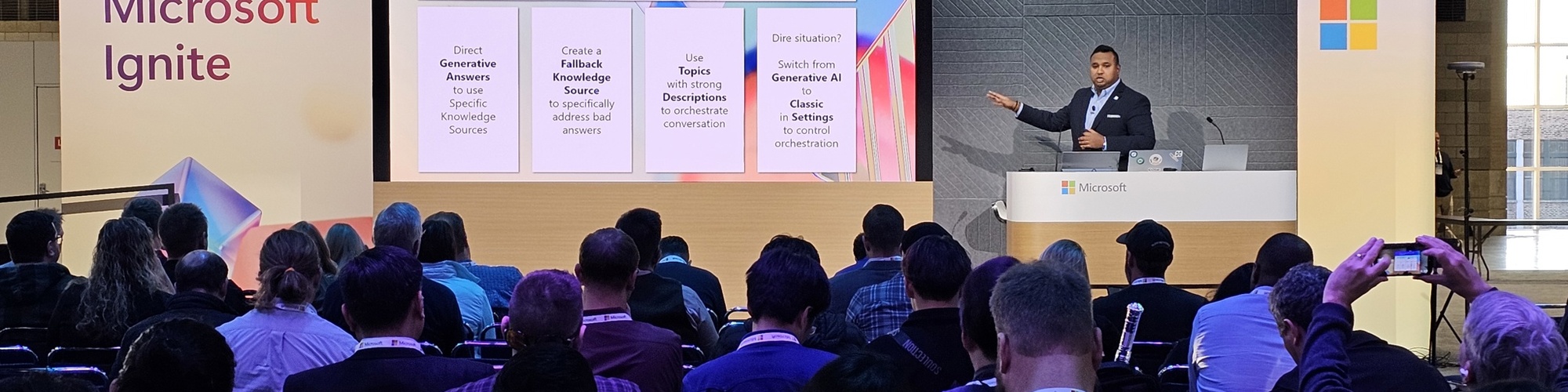
Microsoft Ignite 2024
Presenting "Build Smarter Copilots: 5 Better Bot Best Practices in Copilot Studio" session at Ignite, Microsoft's annual flagship conference for IT professionals, developers and technology enthusiasts.
Days of Knowledge Americas 2024 Sessionize Event
BC TechDays 2024 Sessionize Event
Days of Knowledge Central 2024 Sessionize Event
DynamicsCon LIVE Sessionize Event
Power Platform Learner to Leader User group Sessionize Event
Directions North America 2024 Sessionize Event
Summit NA Roadshow - Dallas Sessionize Event
Power Platform 24 Sessionize Event
Techday Pakistan 2024 Sessionize Event
Global Power Platform Bootcamp 2024 - Saudi Arabia Sessionize Event
DUG Business Central Meetup 2023
Days Of Knowledge Nordic 2023 Sessionize Event
Directions EMEA 2022 Hamburg Sessionize Event
BCUG SolveMyERP Conference 2022
Days Of Knowledge Nordic 2022 Sessionize Event
NAVUG Focus 2019
NAVUG Focus 2018
NAVUG Focus 2017
NAVUG Focus 2016
Please note that Sessionize is not responsible for the accuracy or validity of the data provided by speakers. If you suspect this profile to be fake or spam, please let us know.
Jump to top